
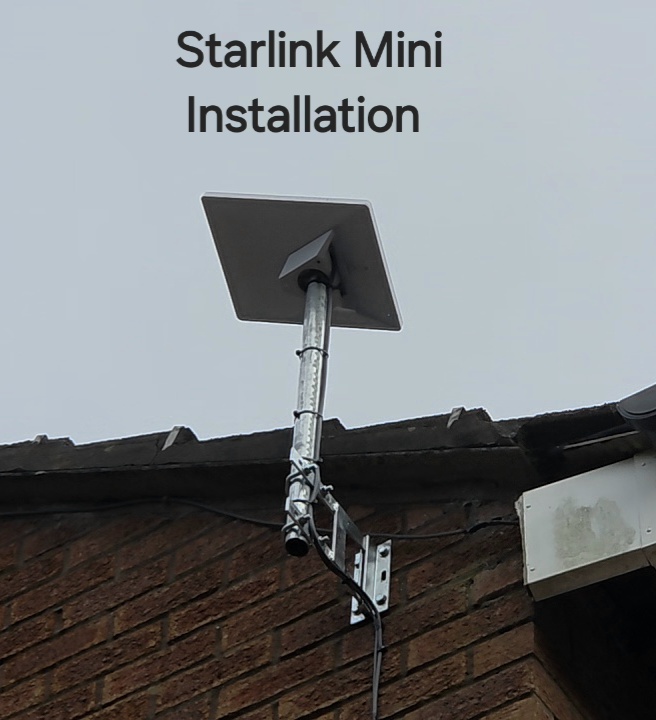
For Starlink Mini home internet, the best place to receive the satellite signal may be a poor place to deliver Wi-Fi to every room. Mini includes a Wi-Fi router inside the outdoor unit. Our Bollington wall-mount project makes this distinction easy to picture: the dish sits outside above the roof edge, while the household’s devices are indoors.
Separate the outside and inside requirements
The dish position needs the sky view required by Starlink. Indoor Wi-Fi has a different job: reaching phones, computers and other devices through the building. Exterior walls, distance and the house layout can make that harder when the Wi-Fi source is outside.
Start with two questions: where can the Mini operate with a suitable sky view, and where must the household connection work? A compact dish can be attractive on the wall without being the complete answer to a large home’s networking needs.
Test before buying extra equipment
Make a list of the rooms that matter most and check the connection there. Include the working desk and places used for video calls, rather than testing only by a window nearest the dish. Note whether a problem affects one device, one room or the whole property.
Starlink’s Mini troubleshooting guidance notes that it is designed for compact coverage areas and that a primary home Wi-Fi setup may have limited coverage. The right response may be a planned indoor network extension, not moving the dish to a position with a worse sky view.
Discuss an indoor connection that matches the kit
Mini has an Ethernet connection that can be used with suitable networking equipment. Discuss the exact cable, weather-resistant connection and router arrangement with the installer. A third-party router setup can involve bypass mode, which changes how Mini’s built-in Wi-Fi is used.
A wired route indoors and a suitable access point or router can be worth considering where a wall separates the outdoor unit from the main rooms. The appropriate arrangement depends on the property and equipment; do not assume any spare router will provide a compatible mesh connection.
Fixed at home or taken away?
If the Mini will also travel, explain that before agreeing a fixed mount. How it will be accessed, disconnected and reinstalled matters. Check the service plan’s current location and usage terms separately; the physical portability of the hardware does not establish what every subscription permits.
Does a good Mini speed test prove whole-home coverage?
No. The reported result in the Bollington project is an observation at that installation. Indoor device performance needs its own checks. A useful handover records the rooms tested and any additional networking agreed.
Read Starlink’s Mini Wi-Fi guidance and its indoor-router connection options. For a different compact mounting example, see our Compstall Mini project.
Project example: Starlink Mini Installation in Bollington: A Fixed Wall Mount.
See the Bollington installation
YouTube loads only when you choose to play and allow its cookies.
Discuss your installation with SpaceTek
Send your postcode, kit details and photographs of the property. Request an installation quote or call Bob on 07802 410 222. See our installation service areas and meet SpaceTek UK.
Plan your satellite internet installation
Send your postcode, property type and any known Wi-Fi requirements. SpaceTek UK will review the site information and explain the practical next step.



