
SpaceTek helps customers looking for Starlink installers in Leyland plan both the outdoor fitting and the broadband changeover indoors. We discuss the mount, cable route and existing Wi-Fi equipment before agreeing the work. Televisions, printers and work devices may already depend on the current router, so include them in the installation brief.
Request a Leyland installation quote or talk to Bob on 07802 410222.
What to send for a Leyland installation quote
Include your full postcode, property type and the Starlink kit model if purchased. Ground-level photographs of the wall, roof edge and proposed cable entry help explain the outside work. For the indoor side, list any mesh system, network switch or wired rooms that need to remain connected.
Tell Bob whether this is a first installation, a permanent mount for an existing kit or a change from another broadband service. The quotation should identify the fitting and any extra network work, with the appointment and access arrangements agreed before the visit.
Nearby project evidence: the Euxton installation reel
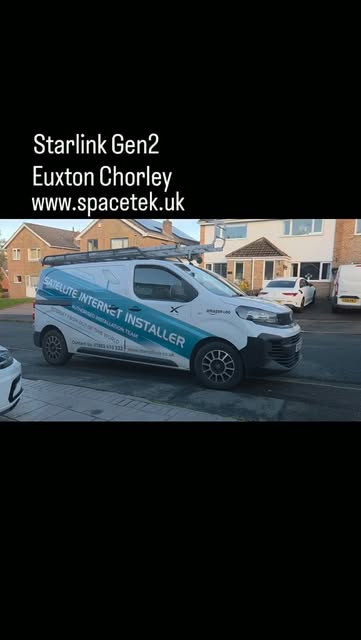
SpaceTek’s Instagram reel published on 24 October 2026 is labelled Euxton, Chorley. It is the nearby project referenced by the archive preview above, not an installation claimed to be in Leyland. Our accompanying project note discusses the Gen 2 equipment and why the exact kit matters when planning accessories and an existing network.
Watch SpaceTek’s Euxton installation reel on Instagram (opens on Instagram), or read the Euxton equipment notes.
For your Leyland quotation, send the model of the dish and the router rather than relying on their appearance. The outdoor support and indoor connections should be checked against the equipment you actually have.
Archive image: SpaceTek Starlink Gen 2 project in Euxton, near Leyland. The linked project provides the local example for this changeover guide.
Make a list of the network you already use
Start at the existing router and note any connected Ethernet cables, switches or mesh units. Photograph their model labels and where the cables go. Add devices that would be awkward to reconnect, such as a television behind a cabinet or a printer used by several computers.
For a Leyland home with an established mesh system, the useful question is whether that system can be incorporated into the new layout. Compatibility depends on the actual equipment. Keep a note of the existing settings and ask what will change, rather than resetting everything before the installer arrives.
Separate account preparation from physical installation
Confirm which Starlink kit you have and who can access its account. Arrange for that person to be available during commissioning. Passwords should be entered by the account holder where needed, not included in a general quotation message or attached to property photographs.
The nearby Euxton Gen 2 project is a useful reminder that different kit generations exist. A mount, connector or network accessory for one model should not be assumed to fit another. Send the model details when asking for a quotation so the physical and indoor requirements can be considered together.
Plan a changeover window
If you work from home, agree a time when a temporary interruption is manageable. Explain any essential meetings or devices before booking. Keep the existing service available until you are satisfied with the new arrangement where that is practical; installation and cancellation dates should be coordinated with the relevant providers.
- Identify the new cable entry and the indoor equipment location.
- Agree whether existing network cables and mesh units are in scope.
- Confirm who will reconnect televisions, printers and work devices.
- Keep access clear around the router, sockets and proposed cable route.
Use a handover checklist that matches your household
Check a device in each agreed room and try the services you actually use. A printer may need attention even when browsing works, while a television may still be using an old wireless connection. Ask for a clear explanation of what has been reused, what has changed and which device provides each part of the network.
Keep model numbers and a simple connection sketch somewhere accessible. That record helps distinguish an equipment, Wi-Fi or service issue if you need support later.
Will I have to replace every device?
Not necessarily. The point of the inventory is to identify what can remain and what needs configuring or adapting. An installation quotation should specify that work instead of leaving the changeover to guesswork.
Further help with your installation
- View the nearby Euxton Gen 2 project
- Planning around an existing mesh network
- Regional installation coverage and local planning advice
Price and changeover questions for Leyland
Does the installation price include my Starlink subscription?
The fitting quotation is separate from hardware purchases and the ongoing Starlink service. It should describe mounting, cable routing and any indoor networking that SpaceTek will provide. Ask for additional equipment and work on existing devices to be identified.
When should I cancel the old broadband?
Coordinate that with the provider and your own working needs. Where practical, keep the existing connection available until the new installation and agreed household checks are complete. A fitting appointment does not cancel another provider’s service.
Customer feedback about SpaceTek
Chris Nagle’s Google review describes help understanding the installation and using the system. That is relevant when agreeing what you need explained at handover. These are business-wide reviews, not reviews attributed to the property owners featured on this page. Read SpaceTek customer reviews on Google.
Discuss your Leyland installation
Send Bob your postcode and a brief description of the job or call 07802 410 222. Photographs taken safely from the ground help us understand the property before arranging the work.
SpaceTek UK is an independent installer. Starlink hardware, subscription and service availability are separate from the installation quotation. Meet Bob and learn about SpaceTek.



