
Our Starlink Gen 2 Euxton video provides a specific local example of an older actuated system. Published on 24 October 2026, SpaceTek’s social post identifies the installation as Euxton, near Chorley. This project note explains what that record establishes and why the equipment model matters when discussing an installation.
Watch the Euxton Gen 2 project on TikTok (opens on the video platform).
View the Euxton installation reel on Instagram (opens on the video platform).
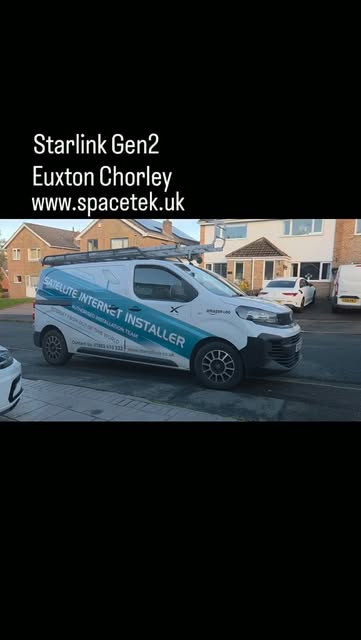
An actuated dish is a particular type of hardware
The project caption identifies Gen 2 and describes its motorised alignment. Starlink refers to this rectangular actuated equipment as Standard Actuated in its support material. That name is more useful for checking instructions and accessories than assuming all rectangular Starlink dishes share the same connections.
For example, Starlink’s Gen 2 router guidance identifies the compatible kits, while its third-party router guidance explains the Ethernet adapter requirement for Standard Actuated. Identify the dish and router separately before ordering network parts.
Use the local example to identify your own equipment
The caption and labelled preview identify the Euxton location and hardware generation. When comparing this installation with your own kit, check the equipment labels as well as the dish shape. Your cable route, mounting parts and indoor coverage requirements will need their own assessment; a short project video cannot provide a complete specification for another property.
The post also compares generations in broad terms. A newer kit should not be treated as a guaranteed speed increase at another home. Assess the service, obstruction information and indoor network against the actual problem you want to solve. A working older installation and a failed component require different decisions.
What to send when you already own a Gen 2 kit
Include photographs of the dish, router and supplied accessories in your enquiry, together with the postcode and whether the equipment is already in service. Explain if you need a first installation, a different mounting position or an assessment of an existing setup. The installer can then distinguish missing accessories from work on the building.
If an existing network must remain, identify the person who manages it and the connection point they need. Ask about compatibility before buying an adapter or replacement router. Changing the network configuration can affect how the Starlink app reaches the equipment, so preserve a record of the working arrangement.
Choose the Euxton guide that matches your next step
For a planned work-from-home connection, the Euxton home-office guide starts with the desk, room coverage and required applications. For a system that has become unreliable, our Euxton troubleshooting guide explains what evidence to collect before deciding on repair, repositioning or replacement.
This article documents the local installation reference. Discuss your own Euxton Starlink equipment with SpaceTek or call 07802 410 222 with the model and a short description of the work needed. SpaceTek is an independent installation business; subscription and account decisions remain with Starlink.
Plan your satellite internet installation
Send your postcode, property type and any known Wi-Fi requirements. SpaceTek UK will review the site information and explain the practical next step.



