
Starlink installers in Glossop need to consider the building and the places where you need internet together. SpaceTek’s local archive photograph shows a dish supported on a wall-mounted pole at the gable of a stone house, with the cable running down the outside elevation. The accompanying video adds the route into the building.
Watch the Glossop project from dish to indoor connection
In the Glossop recording, Bob describes a Generation 3 installation using a galvanised bracket and pole adapter. He then follows the cable down into the building and explains that the router is connected inside. The video documents this job; the reported speed is a historical observation, not a minimum for another property.
Use the photograph and recording to discuss your own mounting surface and indoor destination. A wide view can reveal an extension or neighbouring roof that a close-up of the bracket misses. The finished installation should be checked in the rooms agreed in the quote, as well as beside the router.
YouTube loads only when you choose to play and allow its cookies.
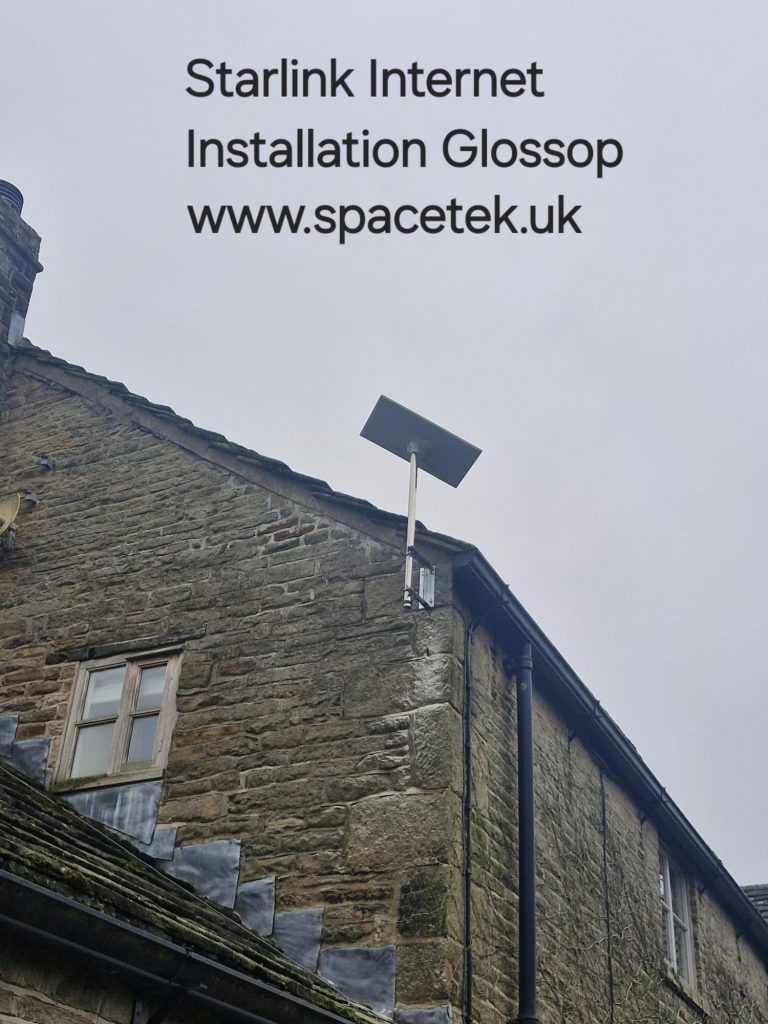
Read the photograph as a set of decisions
The mounting position, pole height and cable route each address part of the installation. The dish sits above the nearby roof covering, while the brackets attach the support to the gable wall. The visible cable continues towards ground level. The photograph helps explain that layout, but a new property requires its own assessment of wall condition, sky view and access.
When requesting a quote, send a wide view as well as a closer photograph. The installer needs to see the space below the proposed position, neighbouring roofs and any extension that changes how the wall can be reached. A close-up of an old aerial bracket on its own leaves many of those questions unanswered.
Choose the mounting surface before ordering parts
Discuss the condition of the supporting structure and which surfaces are acceptable for fixing. Existing repairs, loose masonry or a preferred discreet cable route should be raised before the visit. The complete mount must be appropriate to the dish and the site; compatibility between an adapter and a pole is only one part of that decision.
Our wall, pole and roof mounting comparison explains the options. For a property where outside work requires an owner’s approval, agree the proposed position and cable entry with that person before committing to installation.
Connect the outside route to an indoor plan
Mark where you want the cable to enter and where the router or network connection will be used. Include the room, nearby power and any existing equipment that must remain. A tidy route down the wall should finish at a useful indoor point rather than creating an avoidable extension cable across a living space.
For a stone house, make a room-by-room list of coverage needs. Tell us about a loft room, home office or extension at the enquiry stage. Additional access points or cabling may be appropriate, but their scope should be agreed alongside the dish fitting.
Resolve the sky view at the proposed position
Use the assessment method for your exact Starlink hardware. A picture taken from the pavement does not reproduce the view at the intended dish height, and extra height is useful only when it addresses a real obstruction with a suitable support.
The separate Glossop obstruction guide explains the difference between a pre-installation scan and the obstruction information recorded by a working dish. It also sets out useful evidence to collect before moving an existing installation.
What to include in a Glossop enquiry
- The postcode, property type and whether you own the Starlink kit already.
- The dish and router models, with photographs of labels where helpful.
- Wide exterior photographs taken from a safe position.
- The preferred indoor connection point and rooms needing coverage.
- Access restrictions and the person authorised to approve work on the building.
Ask the quote to distinguish mounting, access, cable work and indoor networking. At handover, check the agreed rooms and confirm who to contact for installation questions. For business continuity work, the Glossop backup test plan covers the additional routing and application checks.
SpaceTek includes Glossop in its Derbyshire and Peak District coverage. The archive image is evidence of local work; the specification for your own building will follow its assessment.
Request a Starlink installation quote in Glossop or call Bob on 07802 410 222. SpaceTek is an independent installation business; your Starlink subscription is arranged separately.
Customer feedback about SpaceTek
Claire and Simon Lightbound’s public Google review highlights knowledgeable advice and help getting a rural connection running. This is feedback about SpaceTek’s service, not a review attributed to the project on this page. Read SpaceTek’s customer reviews on Google.
Plan your satellite internet installation
Send your postcode, property type and any known Wi-Fi requirements. SpaceTek UK will review the site information and explain the practical next step.



