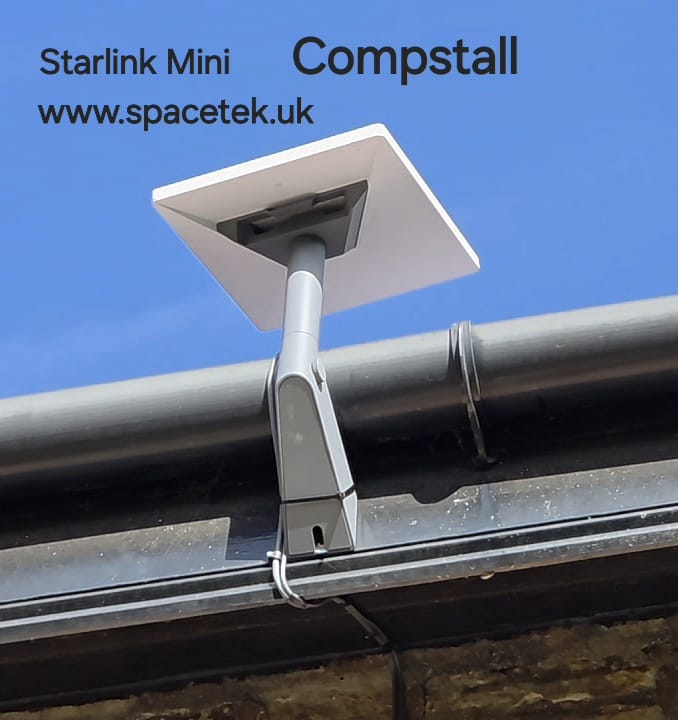
This Starlink Mini installation in Compstall was for a rural property where the customer preferred the smaller unit to a full-size dish. SpaceTek UK’s video explains that choice, and the photograph shows the compact mount beside the gutter.
Watch the Compstall installation
Why this customer chose the Mini
The project video records a preference for the Mini rather than a full-size Gen 4 unit. That makes this a useful example for customers who want to discuss the physical size and appearance of equipment on their property. A smaller unit still needs a suitable mounting location and a properly planned connection indoors.
The video description reports a post-installation result of around 100 Mbps at this property. That is a project-specific observation, not a guaranteed speed or a comparison test between different Starlink kits.
What the finished installation shows
The Mini sits on a short grey mount near the gutter line. The cable follows the mounting area and runs along the building edge. Its position is compact, but the surrounding roof and gutter still need to be considered when assessing clearance and the required sky view.
A similar-looking position at another house may have different obstructions or a different mounting surface. The final support and fixing method should be chosen for the structure, and the view checked from the proposed dish location.
Mini’s integrated Wi-Fi needs an indoor coverage plan
Starlink Mini includes an integrated Wi-Fi router. That is convenient, but the position that provides a good sky view outside may not provide the best signal through the walls of a home. Starlink’s own guidance notes that Mini’s Wi-Fi is intended for compact areas and can have limited coverage in a larger property.
Discuss the rooms and devices that need connectivity before deciding on the setup. If coverage is required well beyond the mounting position, the indoor network may need a separate solution using compatible equipment. That should be assessed for the actual property rather than assumed from the dish’s size.
Information to include in a Compstall enquiry
Tell us whether you already own a Mini, which service you plan to use and where you want internet indoors. Include a wide photo of the roofline, possible mounting surfaces and nearby trees, along with your postcode.
Our North West installation guide explains the wider process. For equipment details, see the official Starlink Mini setup guide.
Compstall installation questions
Does Mini need a separate router to get online?
It has an integrated Wi-Fi router. Whether the property needs additional networking depends on the required coverage and how the equipment is positioned.
Will a smaller dish remove the need for an obstruction check?
No. The mounting location still needs a suitable sky view. Use the Starlink app’s obstruction tool and assess the surrounding building and trees.
Mounting reference: Starlink’s guidance on checking for obstructions.
Discuss your Compstall installation
Send SpaceTek UK your postcode, kit details and property photos to discuss a suitable installation. Request an installation quote or call Bob on 07802 410 222.
Learn more about SpaceTek UK and see more installation projects and guides.
See also: Starlink installation across Greater Manchester and all service areas.
Plan your satellite internet installation
Send your postcode, property type and any known Wi-Fi requirements. SpaceTek UK will review the site information and explain the practical next step.