
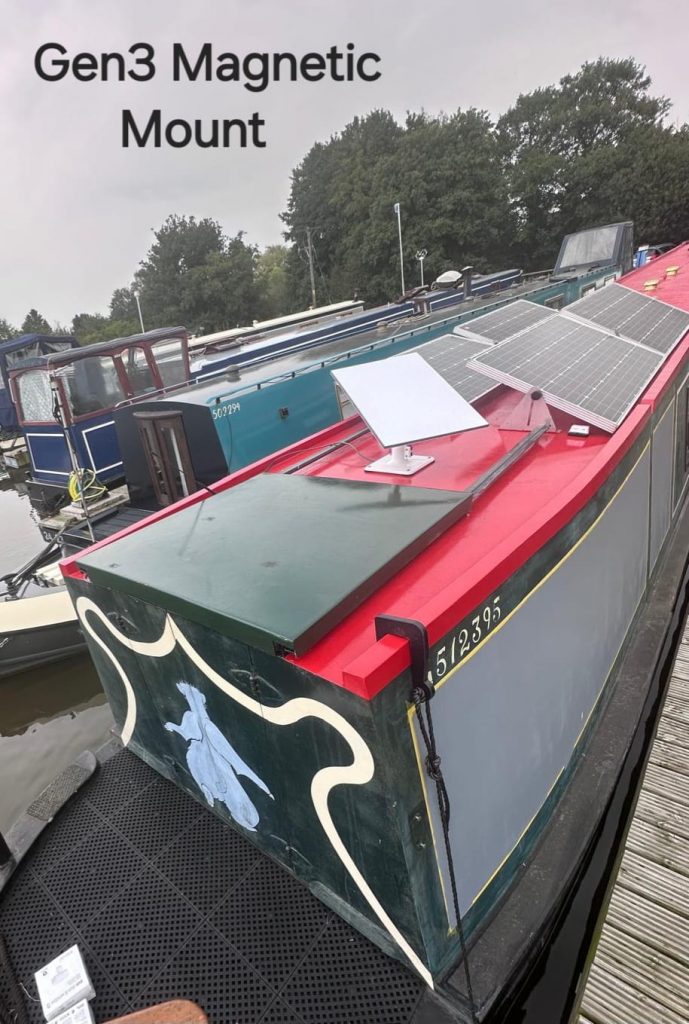
Starlink on a canal boat needs a plan for the boat as well as the internet connection. SpaceTek’s installation example used a Generation 3 terminal with a custom magnetic mounting arrangement. It illustrates a flexible setup, but the right mounting, power and service choices depend on how and where you use your boat.
Guidance reviewed: 22 October 2026.

Starlink on a canal boat: moored use or use while moving?
Decide whether you need connectivity at a regular mooring, at different overnight stops, or while cruising. A connection that works at one open mooring may be interrupted by trees, buildings, bridges or a different roof position at the next stop.
Starlink’s current guidance lists eligible Roam and Priority plans for use while moving and says Residential plans do not permit in-motion use. Check the exact plan, terminal and authorised location before buying or changing your setup. A removable or magnetic mount does not, by itself, establish that an installation is suitable for use while moving.
Read Starlink’s current in-motion plan and hardware guidance. Plan names, limits and eligibility can change.
Choose a mounting arrangement around the boat
The photograph accompanying this article shows the original boat installation. For a new job, the roof material and condition, available space, wind exposure and the route’s clearance constraints all need checking. The dish should not obstruct normal access or equipment on the roof.
A removable arrangement can help when equipment must be stowed, but it needs a secure attachment method appropriate to the surface and use. Magnetic fixing is not a universal choice for every roof. Discuss the mount, cable strain relief and a practical stowage routine with the installer before relying on the setup.
Our Starlink mounting comparison explains the broader choices. A boat requires its own assessment rather than copying a house installation.
Plan power and cable routing together
Tell the installer whether the boat normally uses shore power, batteries or an inverter, and how long the internet needs to run away from a mooring. The supply and any conversion equipment must suit the exact Starlink hardware. Use the manufacturer’s requirements rather than assuming all generations have the same demand or connections.
Agree where the cable enters the cabin and how it will avoid doors, hatches, sharp edges and walking routes. Any entry needs suitable protection and sealing. A removable dish also needs a dry, protected place for the equipment and connectors when stowed.
Electrical alterations should be assessed by a suitably qualified professional. This article is a planning guide, not a wiring specification.
Check Wi-Fi inside the cabin
The satellite link and cabin Wi-Fi are separate parts of the connection. Metalwork, bulkheads and a long cabin layout can limit the coverage from a router at one end of the boat. Test the places where you actually work, stream or make calls.
Router placement, an Ethernet connection or an appropriately positioned access point may help more than changing the satellite terminal. Agree the network layout before running cables so that the installation serves the cabin as well as the dish.
What to send when requesting a quote
- The boat type, roof material and photographs of the proposed mounting area.
- Your usual mooring and whether use while moving is required.
- The Starlink model and current or intended service plan.
- The available power supply and where you need Wi-Fi.
- Any access, clearance or equipment-stowage requirements.
SpaceTek can review this information and explain whether a site visit or further details are needed. Hardware suitability, service eligibility and an installation quote should be confirmed separately.
Discuss a canal-boat Starlink installation, or compare the planning considerations for caravans, motorhomes and holiday homes.
Plan your satellite internet installation
Send your postcode, property type and any known Wi-Fi requirements. SpaceTek UK will review the site information and explain the practical next step.



