
Comparing Starlink vs fibre in Stockport is an address-level decision. The useful question is which service you can order, what problem it solves and how it will reach the rooms you use. There is no single best choice for every home in Stockport, Bramhall, Marple or the surrounding villages.
SpaceTek installs Starlink, but a satellite connection is not automatically the right replacement for working fibre. Use this guide to compare the options before buying equipment. If Starlink looks appropriate, our Stockport installation guide covers the practical next step.
Start with availability at the exact address
Use the Ofcom broadband checker as a starting point, then confirm order availability with the providers themselves. A service available nearby may not yet be orderable at your property. Check Starlink’s own address checker and current plan terms as well.
Check what a provider means by “fibre”. Full fibre, also called FTTP, runs fibre to the premises; part-fibre services retain a copper connection for the final section. Ofcom’s guide to choosing broadband explains these differences and recommends comparing availability, required speed and the whole deal.
Compare the problem you actually need to solve
A slow connection throughout the house
Record when the problem occurs and whether it also happens close to the router or over a suitable wired connection. Ask the current provider to investigate a fault before assuming the service technology is the cause. If the available fixed-line options cannot meet your needs, a properly assessed Starlink installation may be worth discussing.
Good internet downstairs but a weak upstairs signal
This points towards an indoor network problem, although testing is needed to confirm it. Thick walls, an extension or an inconvenient router position can affect either fibre or Starlink. Compare readings in the same room as the router and in the problem room. Tell the installer which devices and rooms struggle, rather than simply asking for a faster dish.
A separate garden office
The connection between buildings needs its own plan. A new service entering the house does not automatically reach the office. Our Romiley garden-office guide compares the practical approaches to that link. Include the office’s distance, power and existing routes when discussing either broadband option.
Compare costs over the same period
Write down the total for each offer over a common period, such as the contract length being considered. Use current quotes and plan terms rather than an old advertised monthly price. Your comparison should include:
- The recurring service charge and any stated price changes.
- Hardware purchase, rental or activation costs, where applicable.
- External installation, access equipment and mounting parts.
- Any indoor networking needed for the rooms you use.
- Existing contract commitments and the arrangements for switching.
A service with a lower monthly headline price may have different initial costs. Conversely, retaining reliable existing broadband and improving indoor Wi-Fi may be a more proportionate solution than replacing the whole connection. Ask for the installation work and provider subscription to be explained separately.
What Starlink needs at a Stockport property
The dish needs a suitable view of the sky, a sound mounting arrangement and a practical cable route. Trees and nearby buildings are site-specific considerations, not something that can be resolved from the town name. See Starlink’s obstruction advice and have the actual proposed position assessed.
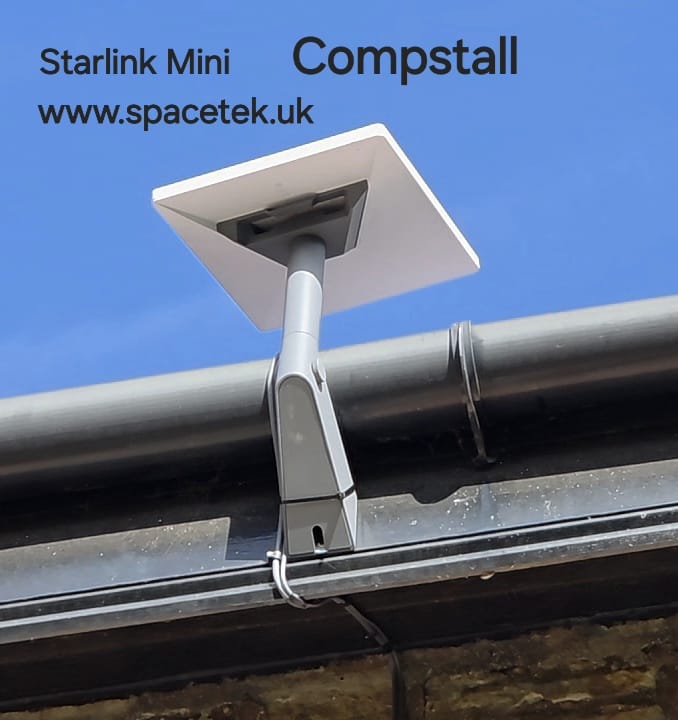
Our Mini installation in Compstall is a local example of equipment chosen for a particular property. It does not show that the same kit or mounting position is right for every Stockport home. The Stockport-area project comparison explains the decisions illustrated by two different installations.
Before you make the decision
List your essential uses: video calls, cloud uploads, streaming, work applications or an outbuilding. Check relevant package conditions with the provider and discuss how those uses will be tested at home. Download speed alone does not describe the whole experience, and an impressive result at another address is not a guarantee for yours.
If dependable full fibre is available and suits your needs, compare that seriously. If your fixed-line choices are limited, Starlink may provide a useful alternative after the site and plan have been checked. For a backup connection, also agree how it will connect to the existing network; buying a second service does not by itself create automatic failover.
Ask for an assessment with the right information
Send your postcode, current service, the problem you want to solve and the rooms needing coverage. Include any Starlink kit you already own. SpaceTek can discuss installation requirements; the service provider should confirm availability, package conditions and account questions. Read the Stockport installation and quotation checklist before arranging the work.
Discuss your Stockport installation
Request an installation quote with your postcode, kit details and property photographs, or call Bob on 07802 410 222. Learn more about SpaceTek UK.



