
Looking for Starlink installers in Widnes because sending files is taking too long? SpaceTek can discuss a permanent installation and the indoor connection your computer will use. Our Widnes project was for a customer who did a lot of uploading, making it a useful example of why download speed alone is not the whole story.
A Widnes installation for a customer who uploads regularly
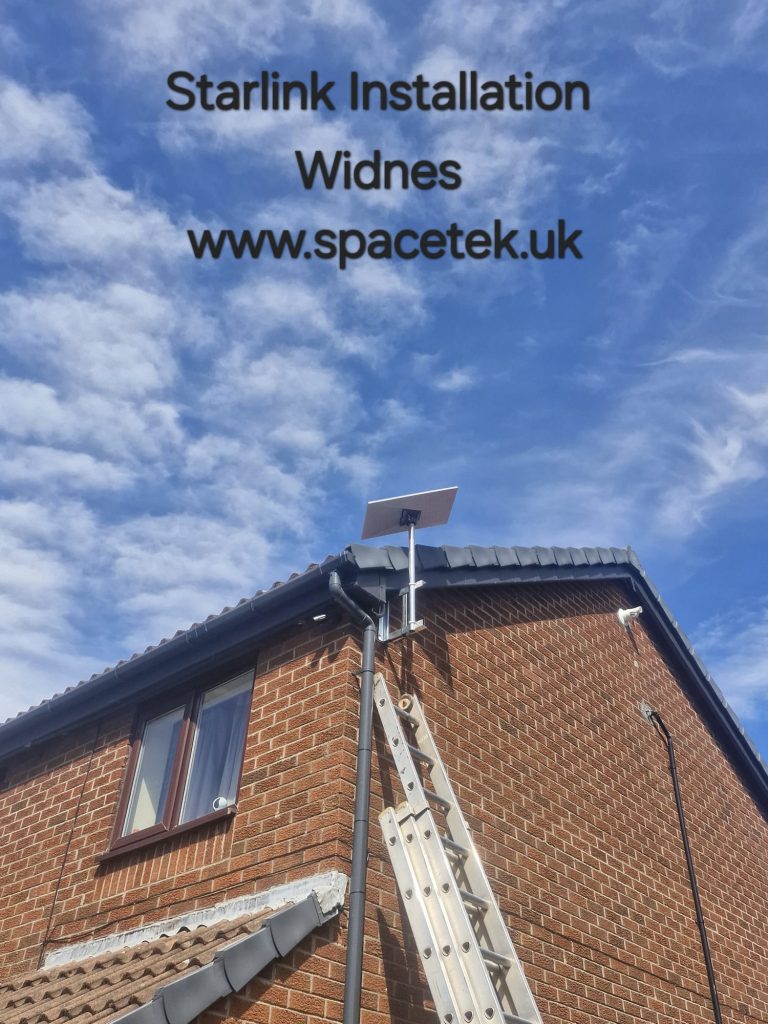
Bob’s original video explains the customer’s frequent computer uploads and shows a Generation 3 dish on a galvanised bracket, alloy pole and adapter. The matching photograph shows the dish raised above a brick gable, with the mounting arrangement near the rainwater pipe.
The clip reports a speed test during that visit, while a software update was taking place. That is a historical observation from one installation. It should not be treated as a guaranteed upload or download speed for another customer.
YouTube loads only when you choose to play and allow its cookies.
Watch the Widnes installation on YouTube.
Start with what you send, not just what you download
Uploading means sending information from your device to the internet. Large photo collections, video files and cloud backups can make this more noticeable than routine browsing. Tell us what sort of files you transfer, how often and whether other people use the connection at the same time.
This helps put your requirements in context. A customer moving occasional documents has a different workload from someone uploading substantial video files every day. Describe the problem and the working location before choosing equipment solely on an advertised download figure.
Measure the connection in the right place
Starlink’s official speed-test guidance distinguishes the router’s internet connection from the connection used by your device. Its default router test does not measure the Wi-Fi path between the computer and router; advanced tests help separate those parts.
That distinction is useful when a file transfer remains slow. Test from the computer’s normal position and note whether it connects by Wi-Fi or cable. The local network, internet connection and receiving service can all affect the experience, so a single headline speed is not a complete diagnosis.
Plan the installation around the computer
The dish needs a suitable outdoor view, while the cable route and router position need to support the indoor workspace. Send photographs of potential mounting positions and describe where your computer or network equipment sits.
Tell us if cloud backups run automatically or if several devices share the connection during work. We can discuss the mounting and indoor connection required, while keeping expectations clear about what installation work can control. Existing equipment details help avoid unnecessary replacement purchases.
Widnes upload and installation questions
Will Starlink make every upload faster?
No result can be promised without considering the existing service, Starlink conditions, your indoor connection and the destination receiving the file. Explain the present problem before deciding on a change.
Should my computer use a network cable?
A wired connection may be worth discussing where Wi-Fi coverage is the limiting factor. The practical route and compatibility depend on your Starlink kit and existing network equipment.
Can the dish use the same position as the project photograph?
It is a useful example of a gable installation, but your property’s surface, clearance, obstacles and access need their own assessment.
Customer feedback about SpaceTek
Chris Nagle’s Google review describes how SpaceTek made installation and use easier to understand. That is business-wide feedback, separate from the Widnes customer’s uploading requirements shown in the project video. Read our Google business reviews.
Discuss your Widnes installation
For a Widnes quote, send your postcode and kit details and describe the uploads or backups you need to handle. Include the computer location as well as exterior photographs.
Ask SpaceTek for a quote or call 07802 410222. Explore our Cheshire Starlink installation coverage and full service areas.