
SpaceTek helps customers planning Starlink installation in Northwich, from the first assessment of the property to the agreed indoor connection. Whether you need a new dish fitted, existing equipment relocated or help with Wi-Fi, a clear brief makes the quotation more useful.
Ask about a Northwich installation with your postcode, kit details and ground-level property photographs, or call 07802 410222.
Separate the internet connection from Wi-Fi coverage
Before choosing the work, describe the problem you are trying to solve. A slow incoming broadband service, an obstructed satellite position and weak Wi-Fi at the far end of a house are different issues. If you have an existing connection, note whether the same problem occurs beside the router and in the rooms you normally use.
For a Northwich home office, identify the desk location and any existing Ethernet sockets. If internet is also needed in an extension or separate workspace, include that destination from the start. A convenient place for the dish cable to enter is not automatically the best position for the indoor network.
A Cheshire installation example to compare
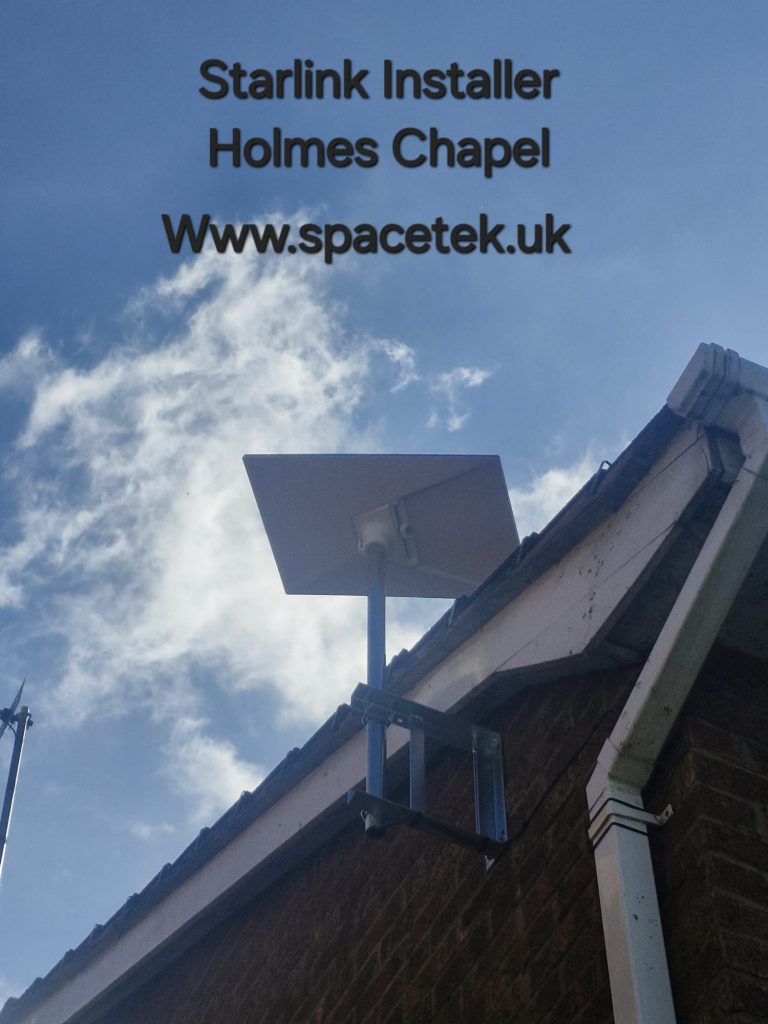
The video below is from our Holmes Chapel project archive. It is a Cheshire example, not a project claimed to be in Northwich. The photographed dish sits beside a roof junction with wall-supported mounting, illustrating how nearby roofs and the route down the building affect the installation brief.
YouTube loads only when you choose to play and allow its cookies.
Watch the Holmes Chapel installation on YouTube.
Read the Holmes Chapel roof-junction guide for the details to look for. Our Lymm cable-entry guide covers the next part of the route, from the outside wall to the indoor equipment.
Prepare the property information before booking
- Equipment: say whether you own a kit and identify its model.
- Outdoor setting: show the wall, roofline, nearby obstructions and ground-level access in wide photographs.
- Indoor destination: name the rooms, desks or wired endpoints that need a connection.
- Other work: mention roof repairs, decorating or renovations that may affect the route.
- Existing services: identify television, broadband or network equipment that must remain in use.
These details let the quotation separate the core installation from any additional access or network work. Take photographs from a safe position; you do not need to climb onto the roof to ask for advice.
Northwich installation questions
Can Starlink replace an indoor Wi-Fi upgrade?
Changing the incoming internet service does not, by itself, guarantee coverage through every wall and room. The Wilmslow whole-home Wi-Fi guide explains how to plan the distribution inside the property.
What if I am moving an existing dish?
Explain why it needs moving and include photographs of the current position and proposed destination. The condition of the support, cable and access needs checking; reusing existing fittings should not be assumed.
How should I judge the completed work?
Check the agreed rooms or wired endpoints as well as the main connection, and keep the equipment and cable-route details. You can also read customer feedback about SpaceTek on Google when choosing an installer.
For neighbouring service areas, visit our Cheshire installation page.
Request a Northwich installation quote
Send your postcode and property photographs, call Bob on 07802 410222 or ask on WhatsApp. Include the kit model, rooms you need connected and any access restrictions so we can explain the next step.
SpaceTek is an independent installer. Starlink equipment, subscription availability and service performance should be checked separately for your address.