
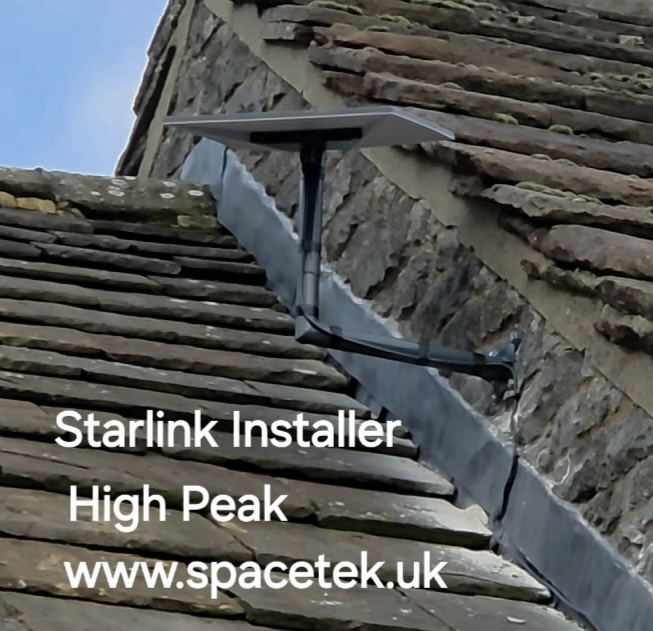
This Starlink High Peak server-room project brings together two different decisions: where to mount the dish on a stone building and where its connection needs to arrive indoors. The installation video shows the dish fixed beside the roof and describes the intended cable route into a small server room.
See the High Peak installation
YouTube loads only when you choose to play and allow its cookies.
Working with the shape of a stone building
The photograph shows an offset bracket on the side wall, beside traditional stone roof coverings and flashing. The dish projects away from the wall rather than sitting directly against it. The surrounding roof planes are a significant part of this installation’s layout.
A stone building needs a site-specific assessment of the fixing surface and access. The visible arrangement does not provide a universal specification for the brackets or fixings at another property. Roof condition, wall construction and the required sky view all influence the practical options.
Planning the connection to the server room
In the narration, the installer explains where the cables are going to come down and enter a small server room. That is the destination described during the recording. The video does not document a completed network cutover, firewall configuration or failover test.
Where Starlink will join an existing network, agree the handover point with the person who manages it. Useful details include the router or firewall model, available ports, where equipment can be powered and who is responsible for configuration. This prevents a finished outside installation from being followed by uncertainty inside the cabinet.
Questions to settle before an installation visit
- Will Starlink be the main internet connection or an additional connection?
- Which device should receive the connection inside the server room?
- Is the external cable route within the limits of the supplied hardware?
- Who will test the network’s essential services after connection?
- Can any change be made without interrupting normal work?
Does reaching a server room create automatic backup internet?
No. A second connection becomes a working backup only when compatible network equipment is configured and tested for that purpose. This project shows the physical installation and planned route. It should not be taken as evidence that a particular failover arrangement was installed.
For wider property planning, read our Derbyshire installation preparation guide. If backup connectivity is your objective, our business failover planning article explains the additional questions to ask.
Discuss your installation with SpaceTek
Send your postcode, kit details and photographs of the property. Request an installation quote or call Bob on 07802 410 222. See our installation service areas and meet SpaceTek UK.
Plan your satellite internet installation
Send your postcode, property type and any known Wi-Fi requirements. SpaceTek UK will review the site information and explain the practical next step.



