
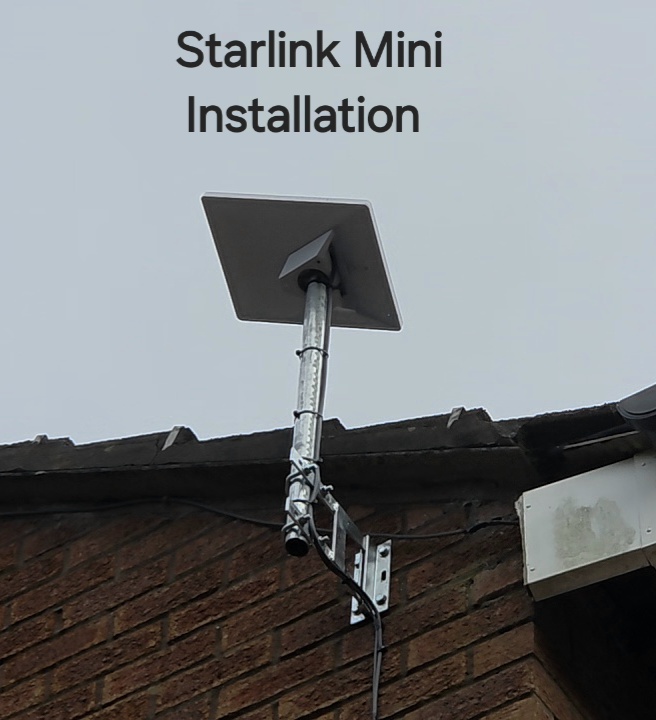
This Starlink Mini installation in Bollington uses a short pole and wall bracket to position the compact dish above a brick gable. The project video identifies the kit as a Mini and describes bringing its cable down to an existing hole in the building.
See the Bollington installation
YouTube loads only when you choose to play and allow its cookies.
A different Bollington project with a smaller dish
Our earlier Bollington side-wall installation featured a standard-sized dish on an offset mount. This is a separate project using Starlink Mini. Keeping the two examples distinct helps homeowners compare arrangements without assuming the hardware or indoor networking needs are identical.
In the new photograph, the Mini sits on a metal pole supported from the brickwork. The mounting raises it above the immediate roof edge. The position still needs the required sky view; the small size of the dish does not remove the need to assess obstructions.
Using an existing entry point
The narration says the cable enters through a previous hole. Reusing a suitable opening can reduce visible changes to a building, but an old opening is not automatically suitable for a new cable. Its position, condition, available space and final weatherproof finish need checking.
The video also notes that an older satellite dish is no longer in use. That does not establish that its cable or mounting components are compatible with Starlink. Any reused part needs to be assessed for the new installation rather than assumed to work.
Mini outside, Wi-Fi inside
Starlink Mini includes its own Wi-Fi router. When the unit is mounted outside, indoor coverage deserves particular attention: the rooms needing a connection may be separated from it by exterior walls and several internal partitions. The official Mini setup guide explains the kit’s connections and mounting accessories.
The installer reports about 100 Mbps during this visit. That is a project observation, not a guarantee of indoor Wi-Fi coverage or a forecast for every device. For a fixed home installation, check connectivity in the working rooms as well as near the unit.
Is Mini suitable for a permanent home position?
A fixed location can be considered, but the decision should include mounting compatibility, power, indoor coverage and the service plan available for the address. Explain whether the Mini is intended to stay at home or also travel, because access and removal requirements may affect the arrangement.
See another Mini installation in Compstall and consult the official Mini setup guide for hardware-specific instructions.
Discuss your installation with SpaceTek
Send your postcode, kit details and photographs of the property. Request an installation quote or call Bob on 07802 410 222. See our installation service areas and meet SpaceTek UK.
Plan your satellite internet installation
Send your postcode, property type and any known Wi-Fi requirements. SpaceTek UK will review the site information and explain the practical next step.



